AI Product Photos for Etsy: What Works and What the Rules Say
You can use AI on your Etsy product photos, as long as they still show the real item the buyer will receive. Etsy's rules ask for your own photos of the actual product, not stock images or renderings, and any item created with AI must be disclosed in its listing. Within those limits, AI is great for clean backgrounds, consistent lighting and lifestyle scenes built around your real product.
Last updated: September 22, 2026. Rules and specs checked on Etsy's official pages that day.
Etsy photo requirements in 2026
These specs come from Etsy's Help Center. They apply whether you shoot with a camera or a phone, or edit with AI.
| What | Etsy's guidance |
|---|---|
| Photos per listing | Up to 20 |
| Videos per listing | Up to 2 |
| Recommended size | At least 2000 px in width and height |
| First photo minimum | 635 px in width and height, or it may show up lower in search |
| File types | JPG, GIF, PNG, SVG or HEIC. No animated GIFs; transparent areas of a PNG turn black |
| File weight | Files over 1 MB may not finish uploading on a slow connection |
| Color profile | sRGB (Etsy converts images to it) |
| First photo shape | Landscape or square; the next photos follow its shape |
| Video | Up to 15 seconds (3 s minimum on one Etsy page, 5 s on another), no sound, max 100 MB, ideally 1080 px or more |
The first photo does most of the selling
Your first photo is your thumbnail in search, and Etsy crops it to square, portrait or landscape depending on where it appears. Etsy's advice: shoot a little further back than you think you need, keep the most important part of the item in the center, and use the thumbnail adjustment tool to check every crop before you publish.
For personalized or made-to-order items the rule is stricter. The first image must show a finished, personalized example similar to what the buyer will receive. A blank product, or a mockup that says "Your text here", is not allowed as the main image.
In practice, a bright, sharp shot of the whole product on a plain background makes the safest thumbnail. That is also where AI is most useful: cleaning up the background and light of a real photo, without touching the product.
The 7 photo types Etsy recommends, and where AI fits
Etsy's Seller Handbook lists seven essential product shots. With 20 slots, you have room for all of them. The last column is our own view of where AI helps and where a real photo is safer.
| Shot | What it tells the buyer | Where AI fits |
|---|---|---|
| Studio (plain background) | Exactly what they will receive | Good: clean the background of your real photo |
| Lifestyle | How it looks in their home or on them | Good: stage the real product in a scene |
| Scale | The real size | Careful: AI often gets proportions wrong. Add measurements |
| Detail | Materials, texture, finish | Use a real close-up. AI tends to invent texture |
| Group | Colors, sets, variations | Only colors and sets you actually sell |
| Packaging | How the order arrives | Only packaging you really use |
| Process | How it is made | Real photos only |
What Etsy's rules say about photos and AI
Etsy does not ban AI tools. Its Seller Handbook even notes that photo editing software increasingly relies on AI. The rules focus on one thing: the buyer must see the item they will actually receive. Here is what the official pages say.
1. Your own photos of the real product
2. A few narrow exceptions
3. Accurate representation
4. Disclosing AI
What we could not confirm
On September 22, 2026 we found no rule on Etsy's official pages that specifically covers AI edits to photos of a physical product. Some blogs describe a new blanket disclosure rule; we could not confirm it on Etsy's pages. The photo standards above still apply. Treat AI as an editing tool on a real photo, and when a scene is generated, say so in one line of your description. It costs nothing and heads off "not as described" disputes.
How Etsnipe's auto prompt keeps your product as it is
In Etsnipe's Listing Generator, the auto prompt (Advanced plan) does a product photographer's job for you. You don't pick any scene:
- 1It studies your photo: the product, its material, who it's for.
- 2It writes the prompts: a different setting for each image, with pro lighting and framing.
- 3It creates the photos: your product as is, never the supplier's photo reposted. Size charts are redrawn cleanly.


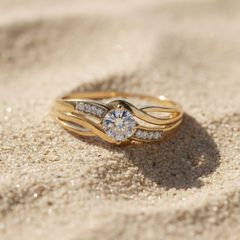
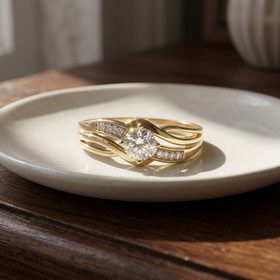
Real results from the auto prompt, with no scene picked by hand.
You still review every image and keep only those that match the item you ship. More in how Etsnipe's AI photo generator works.
How to use AI photos without misleading buyers
- Start from a real photo of the exact item you ship. A phone photo in daylight is a good enough base.
- Keep the product identical: shape, color, proportions, print or logo, material and number of pieces.
- Don't add props that look included. If a scene shows extra items, write "props not included".
- Show the real size. Keep one scale photo, on a hand or next to a common object, and put dimensions in the description.
- Keep at least one real close-up so buyers can judge texture and finish.
- Match each variation to its real color. Never recolor a product into a shade you can't ship.
- Check every image at full size before publishing. Warped text, extra parts, melted edges or a changed detail: delete it and generate again.
- Write alt text that describes the real item. Shops whose default language is English can add up to 250 characters per image, and Etsy says it might help your SEO outside Etsy.
Video: short, silent and real
Etsy says listing videos give shoppers a better idea of your products and can help how your listings appear in Etsy search. You can add two per listing, up to 15 seconds each, and the sound is removed on upload. A few seconds of the item being turned in a hand, opened or worn answers more questions than one more still photo. If you create a video from product photos, the same rule applies: the product must stay identical to what you ship.
A simple 10-photo plan for one listing
You don't need all 20 slots. For most physical products, ten well-chosen images and one short video cover what a buyer wants to know:
- 1 studio shot of the whole product as the first photo, landscape or square
- 2 lifestyle scenes built around your real product
- 1 scale photo, and the dimensions in the description
- 2 real close-ups of material and finish
- 1 photo per color or variant you actually sell (up to 3)
- 1 photo of the packaging you really use
- 1 video of 5 to 15 seconds showing the item handled
Good photos lift conversion, but price still decides your margin. Check yours with our Etsy fees calculator.
FAQ
Does Etsy allow AI-generated product photos?
Etsy allows AI tools, but its Listing Photo Standards require photos of the actual product the buyer will receive. Editing a real photo of your item (background, light, a staged scene) fits that rule. An image of a product you have never photographed does not, apart from the mockup cases Etsy lists.
Do I have to disclose AI photos on Etsy?
Disclosure is mandatory when the item itself is created with AI. For AI edits to photos of a physical item, we found no specific rule on Etsy's official pages on September 22, 2026. A one-line note in your description is still a good idea whenever a scene is generated.
What is the best image size for Etsy?
Etsy recommends at least 2000 pixels in width and height, and at least 635 px for the first photo. Keep files around 1 MB or less, in sRGB, with a landscape or square first photo.
How many photos can an Etsy listing have?
Up to 20 photos and 2 videos.
Can I use my supplier's photos?
Generally not. Etsy asks for your own photos of the product you ship. Commercial images from a manufacturer or distributor are only allowed for items Etsy classes as "sourced by a seller", such as craft and party supplies, subject to intellectual property rules.
Sources
Official Etsy pages checked on September 22, 2026:
- Seller Policy (updated September 10, 2026): own photos, AI disclosure, accurate representation
- Listing Photo Standards (updated July 9, 2024): original photos and exceptions
- Etsy's Creativity Standards (updated June 10, 2025): AI creations, commercial images for supplies
- What is Etsy's stance on AI creations? (Seller Handbook, July 9, 2024)
- Requirements and Best Practices for Images in Your Etsy Shop
- How to Create a Listing: 20 photos and 2 videos
- How to Add Listing Videos
- How to Add a Text Alternative to Your Listing Images
- 7 Essential Types of Product Photos (Seller Handbook, August 25, 2025)