Etsnipe's AI photo generator: auto prompt, scenes and quality
Etsnipe turns supplier photos into real staged product photos, with no studio and no designer. Here's how it works, and what you need to set up (usually: nothing).
Two ways to create your photos
In the Photos step of the Listing Generator, you choose how Etsnipe creates your images.
Nothing to set up: the AI does a product photographer's job.
You pick a scene for each photo yourself.
The auto prompt, in 3 moves
- 1It studies your photo: the product, its material, who it's for.
- 2It writes the prompts: a different setting for each image, with the lighting and framing of a pro shoot.
- 3It creates photos that sell: your exact product, never the supplier's photo.

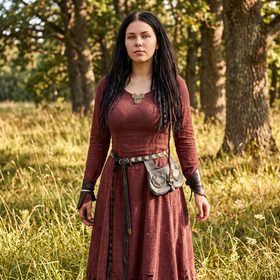
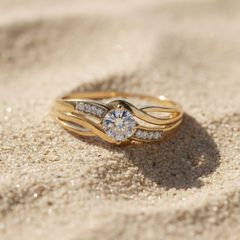
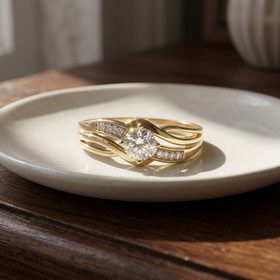
Real results from the auto prompt, with no scene picked by hand.
A garment is worn, a piece of jewelry is shown off, an object sits in a room that suits it. Size charts aren't turned into a scene: they're cleanly redrawn so they stay readable. And if a photo has text you want to keep, tick “Keep the text on the photo”.
My scenes: you pick the setting
Without Advanced, or when you want a precise look, switch to “My scenes”. For each photo, you pick a scene:
- Objects and decor: on a table from the front or from above, held by a person, hanging from a ceiling or on a wall, macro detail.
- Clothing: worn from the front, back or side, laid flat, fabric close-up.
- Your custom scenes: you create them in Listing Settings, under “My photo scenes”, to keep the same look across your shop.
A “Same scene for all photos” option saves you picking them one by one.
Image quality: Standard or High
Standard
Sharp, realistic photos. Ideal for creating lots of listings without draining your credits.
High
More detail and a finer result when buyers zoom in. Useful for jewelry, textures and small items.
You pick the quality for each listing, right in the Photos step.
Up to 10 photos per listing
You tick up to 10 photos to create per listing, variations included. Etsy accepts up to 20 photos, so you can add your own photos of the product.
Etsy's recommended sizes, how many photos, what its rules say about AI: it's all in our guide AI product photos for Etsy.